The problem
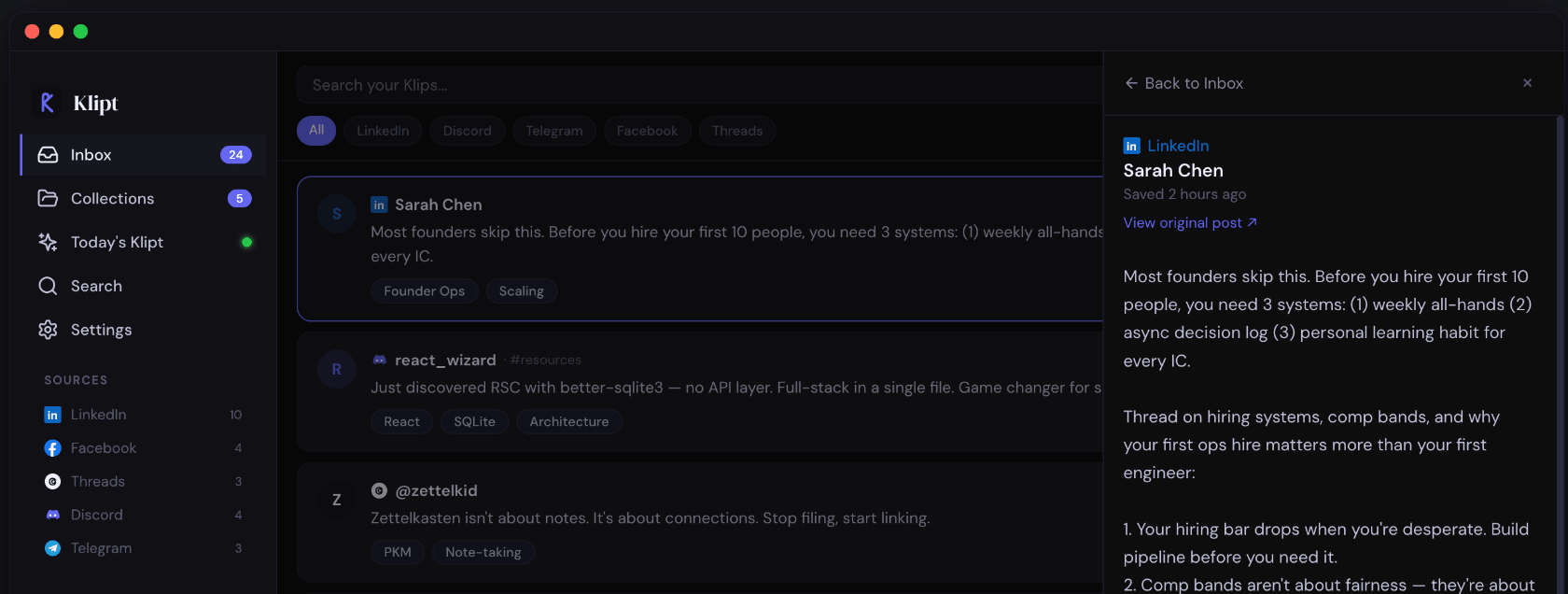
That LinkedIn post about hiring systems. The Discord thread about Tauri plugins. The Telegram message with the perfect framework comparison. You liked it, maybe bookmarked it — but when you actually need it, it's gone. Buried in a feed that doesn't care what matters to you.
How Klipt works
See something worth keeping? Hover and click "✂ Klipt it" from your browser, or press ⌘K from any app on your computer.
Klipt's on-device AI auto-tags every clip, finds related posts in your library, and builds connections — all privately, on your machine.
Search by meaning, not just keywords. Ask "that post about hiring frameworks" and Klipt finds it — even if those exact words weren't in the post.
Clip from anywhere you learn
Features
Klipt reads your clip and suggests tags instantly using an AI model that runs entirely on your computer. Review, edit, or add your own — you're always in control.
Don't remember the exact words? That's fine. Klipt's Smart Search understands what you mean and finds the right clip — even across platforms.
Every day, Klipt picks 5 clips worth revisiting — based on what you've been reading, how long ago you saved them, and what connects to what. Like spaced repetition, but for ideas.
Copy text from Discord desktop, Slack, or anywhere else. Press ⌘K and Klipt captures it instantly — no browser needed.
Group clips into themed collections — Startup Tactics, Design Systems, AI Tools. Klipt even suggests where new clips might belong.
Everything is stored in a single SQLite file on your computer. Export anytime as JSON, CSV, or raw SQLite. No account, no cloud, no tracking. Period.
Privacy-first by design
Klipt is built with Tauri and Rust. Your clips live in a local SQLite database. AI runs on-device — on macOS it uses Apple's built-in frameworks (zero download), and on Windows it uses a one-time 274 MB model. There's no server to breach because there is no server.
Why Klipt?
Pricing
No subscriptions. No upsells. No "premium tiers."
macOS 13+ and Windows 10+ · Intel & Apple Silicon
FAQ